




What You'll Need
FAQ for Discovery Plus Video Downloader
Q1: How to Register Discovery Plus Video Downloader?
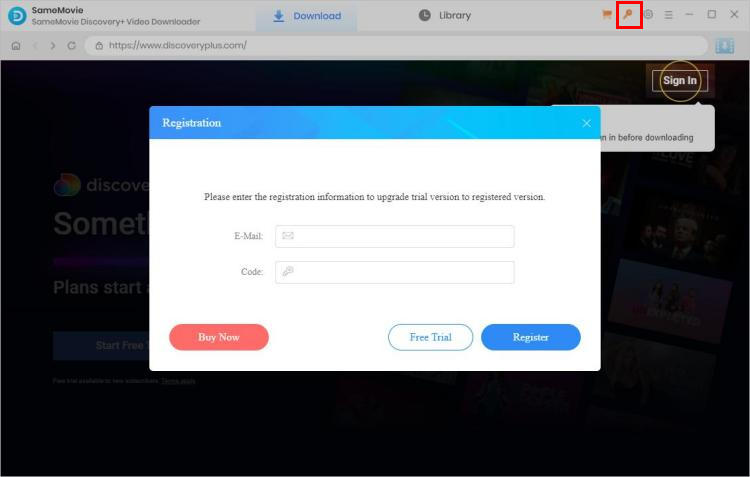
Open the app, look and click the Key icon (on the upper right). Then you will see the registration dialog, just copy and paste the registration email and license code.
Q2: What Devices are Compatible with SameMovie Discovery+ Video Downloader?
SameMovie Discovery+ Video Downloader is compatible with computers running Windows 10, 11 and macOS 11 or later.
Q3: Not Receiving Your License After Purchasing?
If you don't receive your license key shortly after purchase, please check your Spam or Promotion E-mail folder as it may have been misclassified. In case of any delays caused by internet or system glitches, email typos, etc., please contact us for prompt assistance.
Q4: How can I fix an "Invalid Code" error?
If you receive an "Invalid Code" message, please try the following:
- Please make sure that the installed program matches the product and version you purchased. If you are using the wrong version or platform, the registration code may not work.
- Please check that the registration code exactly matches the code in your purchase confirmation email. Make sure there are no extra spaces or incorrect characters.
- One registration code can only be used on one device at a time. If the code has already been activated on another device, please log out of or deactivate the previous device before trying to activate it on your current device.
- If the issue persists, please contact our customer support team via support@samemovie.com for further assistance.
Q5: Are There Any Limitations on the Number of Downloads I Can Make with SameMovie?
There are no limitations on the number of downloads you can make with SameMovie; feel free to download as many videos as you wish, ensuring you have sufficient storage space and a strong network connection for optimal download speeds.
Q6: Failed to Update SameMovie Program?
If you encounter issues while trying to update the SameMovie program, please try to download the latest version from the Download Center directly.
Q7: What Kind of Video Does SameMovie Support Downloading?
SameMovie Discovery Plus Video Downloader supports downloading any movies, shows, documentaries, animes, and more from Discovery Plus.
Q8: Can I Download Discovery+ Content in HD Quality?
Certainly, SameMovie Discovery+ Video Downloader supports a maximum quality of 1080P. However, it's essential to understand that the video quality you can obtain depends on the quality of the original video. If the original video is only available in lower quality for streaming, SameMovie cannot enhance its quality to a higher resolution.
Q9: What's the Format of the Downloaded Video?
MP4 or MKV. You can change the output format on the General Setting window by clicking the Gear icon at the top-right of main interface.
Q10: What Should I Do If I Ordered the Program Twice?
Please contact our support team with the order IDs. We will refund you as soon as possible.
Q11: How to Speed Up the Download Process?
SameMovie keeps updating its downloading core to speed up the download speed. Additionally, it also supports hardware acceleration with the latest Intel/NVIDIA/AMD graphics cards. Just make sure you have the latest graphics cards. Here is how to check and upgrade the graphics cards:
1. Upgrading your graphics card is a straightforward process. Simply right-click on the Windows Start menu and select "Device Manager." Locate "Display adapters," right-click on your graphics card, and choose "Update driver" from the drop-down menu.
2. Plus, you can manually install the latest graphics driver from the official website of your graphics card manufacturer: Intel / NVIDIA / AMD (choose the exact one according to your computer). After upgrading your graphics driver, please reboot your computer to activate it.
Q12: What's the Difference Between External, Internal or Hardcode Subtitles?
SameMovie offers three kinds of subtitles encoding ways to meet users' needs for playing video on different media players or devices. You can change the mode on General settings window or Advanced Download window.
External subtitles are separate subtitle files that are stored separately from the video file. They can be turned on and off during playback and are often distributed as .srt, or .vtt files.
Internal subtitles are embedded within the video file itself, and they cannot be easily removed or altered. They are part of the video file and cannot be separated from it.
Hardcoded subtitles, also known as burned-in subtitles, are permanently merged with the video frames. They cannot be turned off or removed, as they are "burned" into the video itself. This makes them a permanent part of the video and cannot be switched off during playback. But please note that you can store subtitles in only one language to the video at a time with this mode.
Q13: Can I Preserve 5.1 Surround Sound?
No, sorry but SameMovie Discovery+ Video Downloader doesn't support keeping 5.1 audio.
Q14: Solution to other error codes or what if the problem persists?
If you encounter error codes not listed above or if the issue persists despite following the provided solutions, please share the following information with our support team at support@samemovie.com for further analysis:
- Your computer OS and the region of your account.
- A detailed description of the issue, including what happened, what troubleshooting steps you have already tried, and the results.
- Screenshots or a video showing the issue, if available.
- The URL of the video you were trying to download or process.
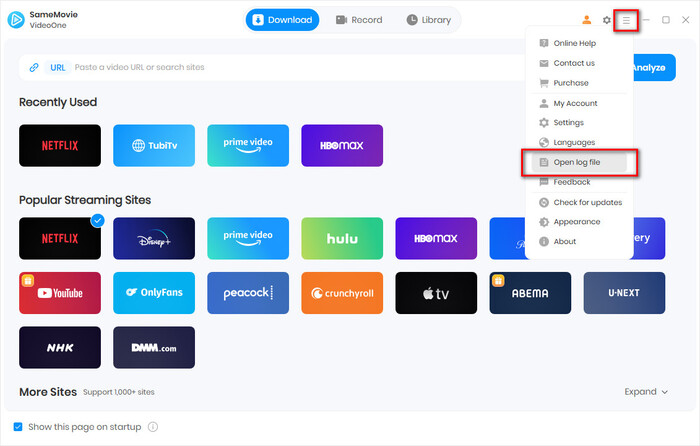
- Log files, which you can find by clicking the Menu icon in the upper right corner > Open Log File.
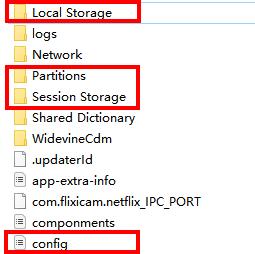
- Login cache files. Please send the relevant files located in the same folder as the log files. As these files may be large, we recommend compressing them into a ZIP file and sharing them through a file transfer service. You can use Buzzheavier to upload and share the ZIP file with us.
Haven't found the answer? We can help.
Contact UsContact us and we'll get back to you as soon as possible.
