




What You'll Need
FAQ for HBOMax Video Downloader
Q1: How to register for HBOMax Video Downloader?
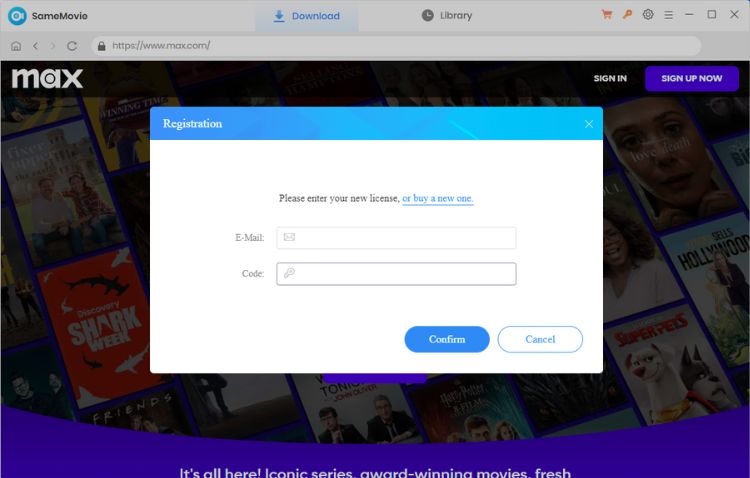
Just click the Key icon in the upper right corner of the interface to open the Registration window, or click the Menu icon and select the Account option. Then copy and paste the registration code and email address you received into the box and click "Regitser" button to complete the registration.
Q2: Why didn't I receive an email with the registration code?
Usually, your email address will receive the registration code a few while after payment. If not, please check your spam or promotional email folder to prevent it from being mistakenly categorized as spam or promotional email.
Entering an incorrect email address or network failure could be the reason if you haven't gotten the email after a long time. Please contact us for help.
Q3: How can I fix an "Invalid Code" error?
If you receive an "Invalid Code" message, please try the following:
- Please make sure that the installed program matches the product and version you purchased. If you are using the wrong version or platform, the registration code may not work.
- Please check that the registration code exactly matches the code in your purchase confirmation email. Make sure there are no extra spaces or incorrect characters.
- One registration code can only be used on one device at a time. If the code has already been activated on another device, please log out of or deactivate the previous device before trying to activate it on your current device.
- If the issue persists, please contact our customer support team via support@samemovie.com for further assistance.
Q4: What should I do If I ordered the program twice?
If you want a refund due to repeated purchases, please contact us via email in time and we will refund you.
Q5: What kind of video does SameMovie support downloading?
SameMovie HBOMax Video Downloader supports downloading almost all content in HBO Max and Max. Even if you subscribe to the With Ads Plan, you can download your favorite content through SameMovie.
Q6: What's the format of the downloaded video?
MP4 or MKV format. Besides, SameMovie also provides an option to choose the video coding: H.265 and H.264. You can choose according to your needs in the Settings window.
Q7: If I subscribe to the Max plan through Hulu, which means I subscribe to both services, is there an all-in-one downloader that supports downloading Hulu and Max videos?
SameMovie not only has an all-in-one downloader, SameMovie Video One, but also a single application for each streaming service, SameMovie Hulu Video Downloader and SameMovie HBOMax Video Downloader.
SameMovie Video One supports downloading videos from over 15 sites, including Netflix, DisneyPlus, Hulu, YouTube, and more. This is a cost-effective and good choice.
 If you want to try one of our single app for free, we're running a "Write Review, Win Free License" campaign.
Q8: What video quality can I download with SameMovie?
SameMovie supports downloading up to 1080p videos from HBO Max and Max.
Q9: How to speed up the download process?
If you want to speed up the download process and run the app more smoothly, you need to have a graphics card supported by SameMovie installed on your computer. SameMovie supports hardware acceleration for the latest versions of Intel/NVIDIA/AMD graphics cards. Here's how to check and upgrade the graphics card:
- Step 1: Press the Windows key + R, enter "DxDiag ", and click the OK button.
- Step 2: Select the "Display" tab.
- Step 3: The graphics card's name, manufacturer, and current driver version are displayed.
- Step 4: Visit the corresponding driver manufacturer's website Intel / NVIDIA / AMD to get the latest driver.
Q10: SameMovie offers three subtitle formats, what are they?
When choosing how to save subtitles in the Settings window, you will see three choices.
- Internal subtitles: It means that subtitles will be built into the downloaded video. Multiple language subtitles can be saved, and you can switch between them whenever you like while watching.
- External subtitles: It means that the subtitles are downloaded and stored separately from the video file. Subtitles can be saved in SRT format.
- Hardcode subtitles: It means embedding subtitles directly into the video image. It has the advantage that it can be played on any player, but it can only save subtitles in only one language to the video.
Q11: Solution to other error codes or what if the problem persists?
If you encounter error codes not listed above or if the issue persists despite following the provided solutions, please share the following information with our support team at support@samemovie.com for further analysis:
- Your computer OS and the region of your account.
- A detailed description of the issue, including what happened, what troubleshooting steps you have already tried, and the results.
- Screenshots or a video showing the issue, if available.
- The URL of the video you were trying to download or process.
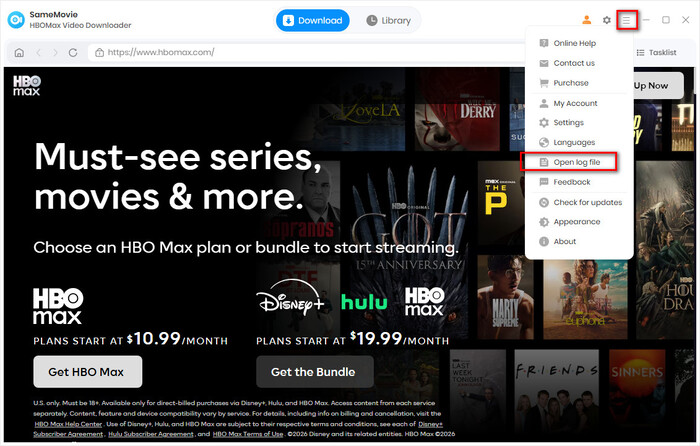
- Log files, which you can find by clicking the Menu icon in the upper right corner > Open Log File.
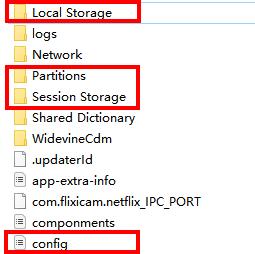
- Login cache files. Please send the relevant files located in the same folder as the log files. As these files may be large, we recommend compressing them into a ZIP file and sharing them through a file transfer service. You can use Buzzheavier to upload and share the ZIP file with us.
Haven't found the answer? We can help.
Contact UsContact us and we'll get back to you as soon as possible.
