


How to Stream Netflix Movies and TV Shows on VLC

Claire Green January 19, 2026 Category: Netflix Tips
Many people like to use VLC to play local files. This is because it is not only free, powerful, and ad-free, but also supports arbitrarily adjusting playback speed, substitles and screen filters.
However, Netflix's black screen makes it almost impossible to stream Netflix on VLC. Luckily, there is still a reliable workaround in 2026 - downloading Netflix movies and TV shows as MP4 files and playing them on VLC. Let's look at how to do it!
You may also like 👉: 6 Legal Ways to Get Netflix for Free in 2026
Reading Guide
What Are the Benefits of Playing Netflix on VLC?
Playing Netflix videos on VLC Media Player gives you far more freedom than the official Netflix player. Instead of being limited by the Netflix player's restrictions, VLC lets you take full control of how you watch your Netflix content. Here are the benefits of streaming Netflix on VLC.
- ✅ Get rid of the limitations of the official Netflix player (buffering, ads, etc.)
- ✅ Freely adjust playback parameters such as brightness, contrast, hue, sharpness, noise reduction, aspect ratio, playback speed, audio delay, equalizer, etc.
- ✅ Flexibly control Netflix subtitle, such as external subtitles, forced display, and adjustments to font/size/position/color/border.
- ✅ Permanently save Netflix content, unaffected by Netflix account expiration or device restrictions.
- ✅ Stream Netflix on older devices.
⚠️Note: VLC doesn't support downloading Netflix content directly, so you need a third-party tool like SameMovie Netflix video downloader to download Netflix movies and TV shows in advance.
VLC's Hidden Features You Might Want to Know
1. Convert Audio or Video Files to Any Format
With the built-in converter, VLC Media Player allows you to convert video and audio files to various file formats.
2. Screen Recording Feature
You can use VLC to record videos being played, capture off-screen footage, or take screenshots of the currently playing movie or TV show.
⚠️Note: Recording videos from Netflix might encounter black screens. Use a third-party tool like SameMovie Video One to record Netflix smoothly without buffering.
How to Download and Play Netflix on VLC?
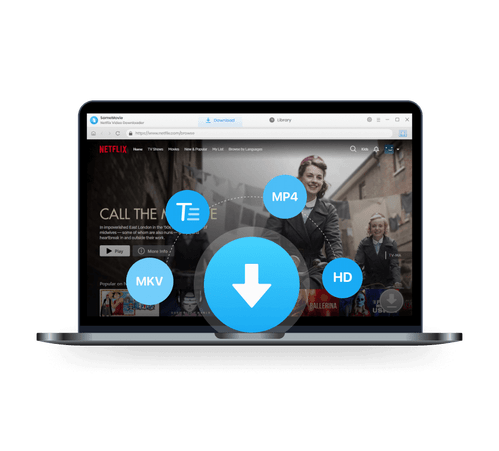
SameMovie Netflix video downloader is a strong tool that lets you download full HD Netflix movies or TV shows on laptop. With SameMovie, you can download Netflix movies as MP4 or MKV files for seamless playback through VLC. Also, you can keep the original Netflix Dolby Atmos and multi-language subtitles in three formats (internal, external, and hardcoded).
Once downloaded, you can play Netflix movies and TV shows with VLC, and adjust their parameters as you wish. Additionally, with its batch download feature, you can download several Netflix movies or an entire Netflix season at a time. With its hardware acceleration, the downloads will be completed very quickly.
SameMovie Netflix Video Downloader:
- Download 1080P Netflix movies and TV shows on your laptops.
- Keep Netflix movies and TV shows permanently.
- Download Netflix videos as MP4/MKV files to play through VLC.
- Keep the original Netflix Dolby Atmos and multi-language subtitles.
- 10X faster downloading multiple Netflix movies.
Tutorial: Download Netflix Video with SameMovie
Download Netflix Video Downloader on Windows 11/10/8/7, then click on the exe file to install it. After the installation is complete, you can launch Netflix Video Downloader.
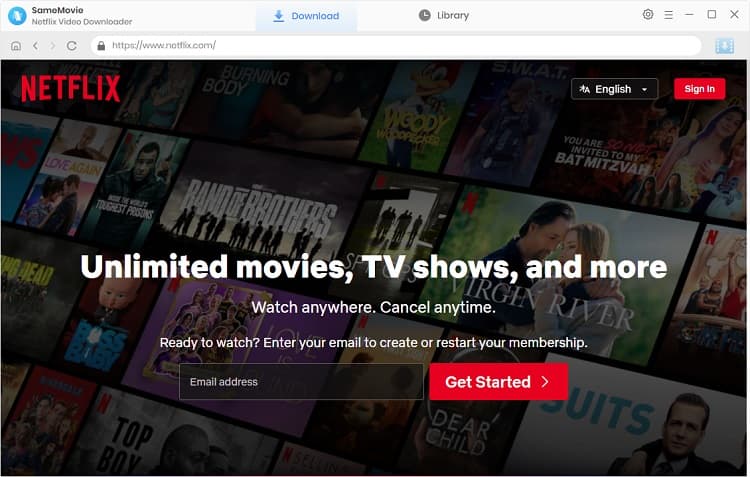
STEP 1 Sign in to Netflix
Sign in to your Netflix account with your login credentials by clicking the "Sign in" button.
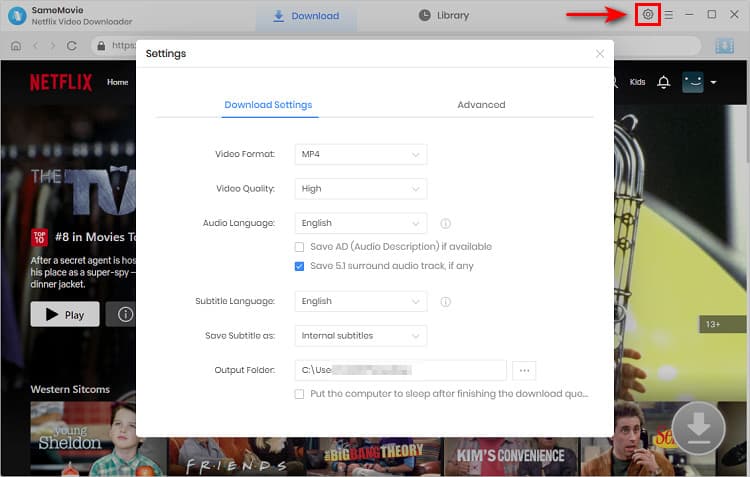
STEP 2 Customize the Download Settings
Click on the "Settings" icon in the upper right corner of the interface. On the prompt, you can customize the download quality to High, Medium, or Low, and change the output folder.
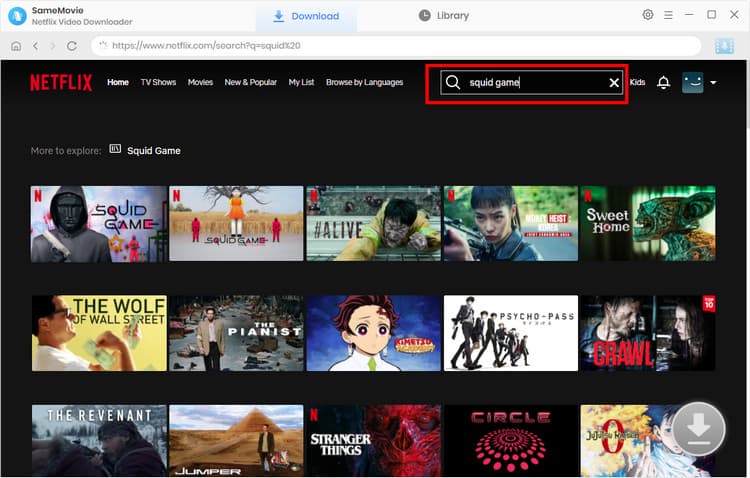
STEP 3 Search the Netflix Movies or TV Shows
Simply type the movie or TV show you want to download in the search bar, or browse the Netflix library in the built-in browser to find the videos you want to download.
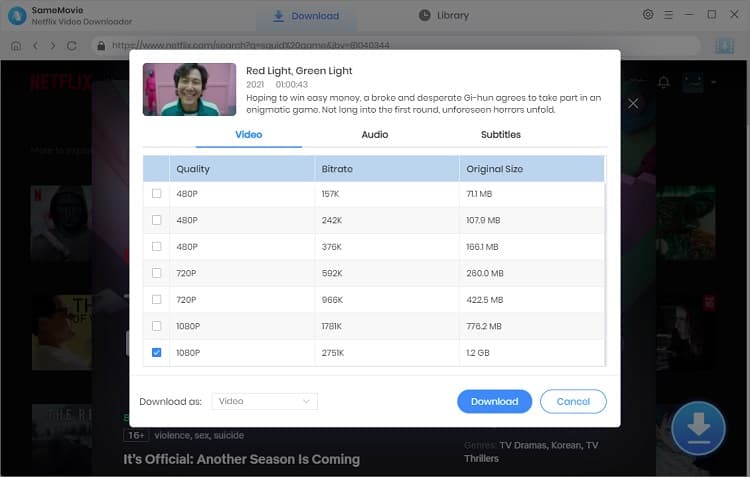
STEP 4 Choose Advanced Download Settings
SameMovie supports grabbing and downloading movies and TV shows from Netflix. For Netflix TV shows, you can click the "Download" icon  to select the episode and then click on the "Advanced Download" button to choose the download quality (1080p, 720p, and 480p), audios, and subtitles languages. For Netflix movies, open the "Advanced Download" window by clicking the "Download" icon.
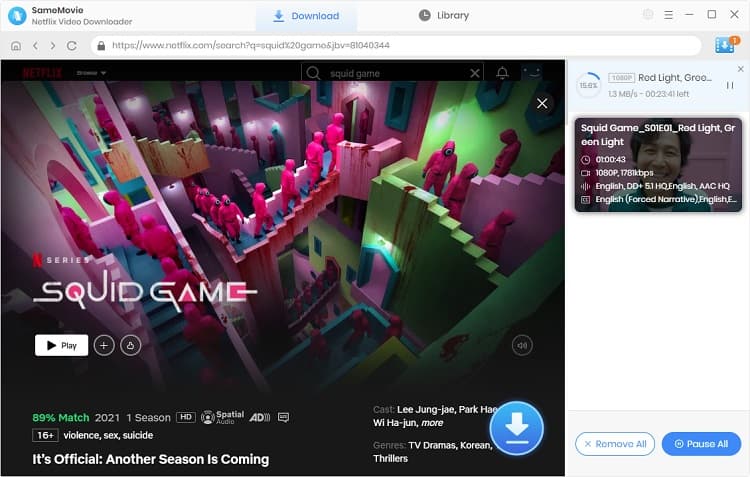
STEP 5 Start downloading Netflix videos to your PC
Click on the "Download" button, and the program will start downloading the title and save it to the output folder you have chosen in the previous step.
After the downloading is complete, you can click on the "Library" tab at the top to check the well-downloaded videos on the local drive.
STEP 6 Play Netflix Downloads on VLC Media Player
You can right-click the well-downloaded video file and choose VLC from the drop-down list of "Open With" to play the Netflix video. Or you can:
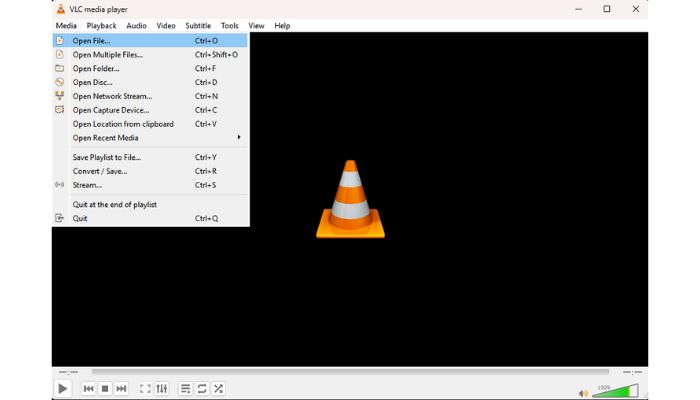
- Open VLC Media Player on your computer.
- In the VLC interface, click on "Media" in the top menu.
- Click "Open File" from the dropdown menu.
- Click on the "Add" button.
- Choose the downloaded Netflix video to stream.
How to Play Amazon Prime Video through VLC?
Is it possible to play videos from Amazon Prime Video through VLC? There is a dedicated way let you play Amazon Prime videos through VLC.
Learn MoreFAQs about Streaming Netflix on VLC
Can I use Netflix's own download feature and play those files in VLC?
No. Netflix app downloads are stored in a proprietary, encrypted format on your device (not true local files). They can only be played inside the official Netflix app and will expire when your subscription ends or after the offline viewing period. You need a third-party tool like SameMovie Netflix video downloader to download them as MP4/MKV files.
How do I get better subtitles or adjust playback in VLC?
After downloading Netflix content with SameMovie, you can get different audio tracks and multi-language subtitles. Save subtitles as an external file so you can add external .srt subtitles to VLC while streaming. After that, you can freely change the font/size/position/color of the subtitles as you wish.
Is it legal to download Netflix with SameMovie?
Downloading Netflix movies and TV shows with SameMovie is completely legal as long as you use it for personal use. However, if you distribute, publicly share, or even sell Netflix content without permission, you not only violate Netflix's Terms of Service but may also breach local laws.
Conclusion
VLC is a highly versatile media player that can play a wide range of file formats. However, it does not natively support playing Netflix movies. If you want to watch your favorite Netflix shows and movies on VLC, use SameMovie Netflix Video Downloader to download them as MP4/MKV files.
Once the downloads are complete, you can transfer them to any device and play them on VLC without any limitations.
Tips: How to Upscale Video With AI in a Simple Way?
With AVCLabs Video Enhancer AI, the old homemade videos, music videos, recordings, commercials, or movie clips in poor quality can be enhanced to give you the best viewing experience on modern displays, and social media. Check the full review of AVCLabs Video Enhancer AI
Learn More
Claire Green, a content writer specializing in blogs. With a passion for streaming video, Claire explores the latest trends, reviews popular platforms, and provides insightful tips for optimizing your streaming experience.
Tips You May Want to Know

What You'll Need
Recommend