


How to Add Netflix Downloads to Google Drive

Claire Green January 26, 2026 Category: Netflix Tips
Google Drive keeps your data up to date across devices and lets you share videos. Uploading Netflix videos to Google Drive should be ideal for keeping Netflix movies and TV shows. However, Netflix downloads are only available on its own official app, and are not allowed to be transferred to other places, including Google Drive.
How can you get rid of these limits and add Netflix downloads to Google Drive, then? This article introduces a reliable method that lets you download Netflix movies and series on laptops and upload them to Google Drive!
 You May Also Like: How to Watch Netflix on Nintendo Switch in 2026?
1. Can I Put Netflix Movies to Google Drive?
Yes, Google Drive lets you upload and keep Netflix movies and TV shows safely in the cloud. Once the Netflix movies are uploaded to your Google Drive, you can access them from any device with an internet connection. It's a convenient way to backup and access your Netflix movie collection.
Benefits of Saving Netflix Downloads to Google Drive
- ✅ Permanently save your favorite Netflix movies and series.
- ✅ Store Netflix content in the cloud and access it across all your devices via Google Drive.
- ✅ Share Netflix movies or series with your family or friends and watch them at the same time!
- ✅ Never lose your content, even if your device is damaged.
- ✅ Watch Netflix on all devices (Windows, Mac, Android, iOS, etc.) supported by Google Drive.
However, the downloaded videos in the Netflix app cannot be transferred freely. How do you upload Netflix movies or series to Google Drive? Keep reading!
2. How to Download and Upload Netflix Movies to Google Drive?
SameMovie Netflix Video Downloader is designed to help you download Netflix movies or series as MP4/MKV files so to upload them to the Google Drive. Besides, you can not only keep the full HD video and original Netflix Dolby Atmos sound, but also retain multi-language subtitles in three types: internal, external, and hardcoded.
What's more, SameMovie supports batch downloads, so you can download several Netflix movies or an entire Netflix season at a time. With the hardware acceleration, the downloads will be finished at 10X faster speed. Once done, you can upload your Netflix movies to Google Drive and transfer them to any device.
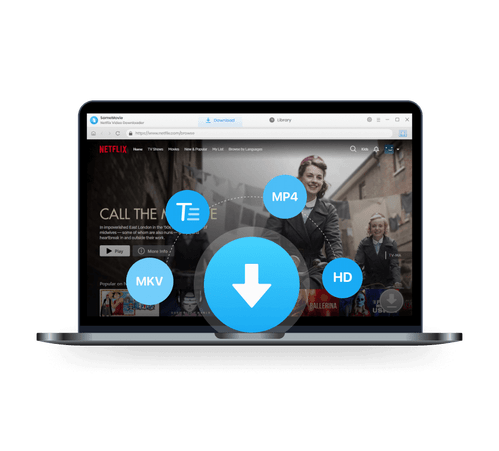
SameMovie Netflix Video Downloader:
- Download Netflix movies, TV shows, documentaries, and more
- Download Netflix videos with HD (1080p and 720p) quality kept
- Support downloading subtitles and audio tracks
- Support fast multi-stream and multi-video downloading
How to Add Netflix Videos to Google Drive?
Follow the detailed guide to learn how to upload Netflix titles to your Google Drive.
STEP 1 Install and Open SameMovie Netflix Downloader
SameMovie Netflix Video Downloader is compatible with Windows and Mac systems. Install and launch the program. In the main interface, click the "Sign In" button to access your Netflix account.
Note: SameMovie requires a Netflix account to connect to its services. Rest assured, SameMovie won't collect any information other than the videos. Your privacy and safety can be guaranteed to the greatest extent.
STEP 2 Adjust Output Settings
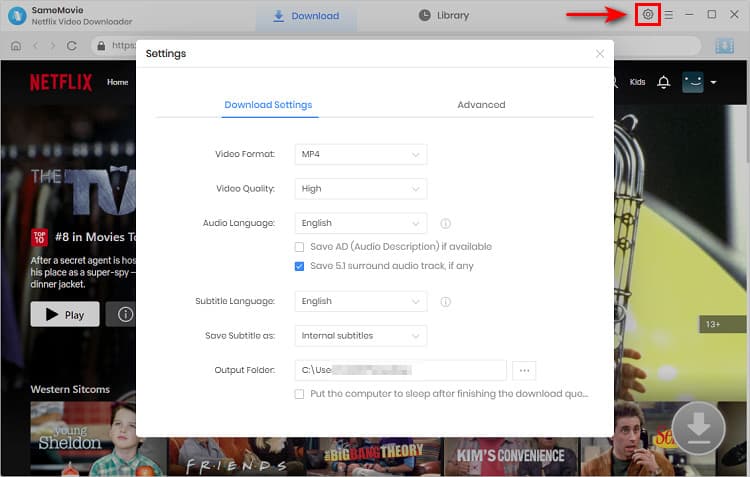
You can change the download settings by clicking the gear (settings) icon in the upper-right corner. You can select the video format (MP4 or MKV), the video quality, the languages for the audio and subtitles, the subtitles mode (3 kinds of options), and other parameters.
STEP 3 Find Preferred Netflix Video
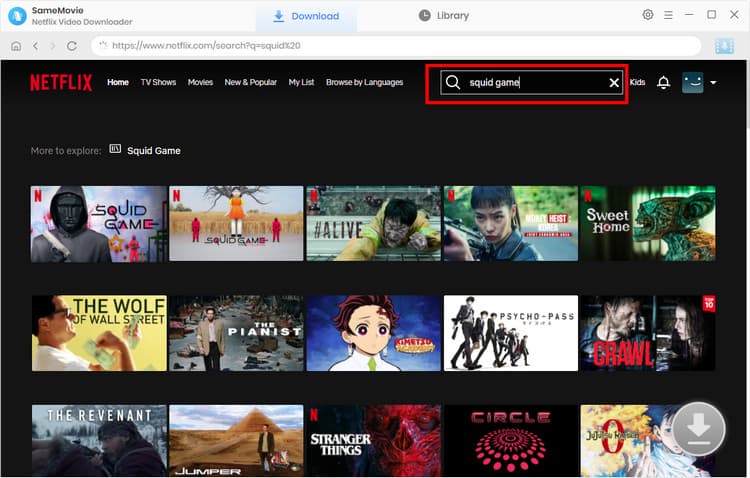
To search for the video you want, you can search for videos by their name or using specific keywords within the built-in browser. Or, you can directly paste the video link in the search bar.
Select and click the target video to view the video's details page or play it directly. At this time, the "Download" icon  will turn blue.
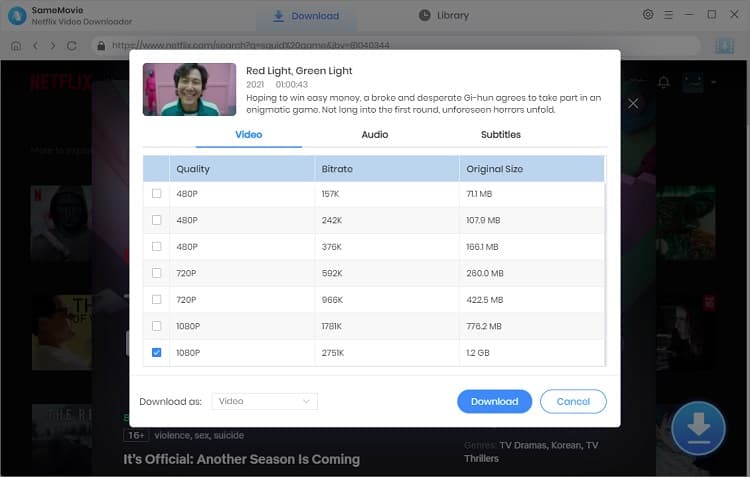
STEP 4 Advanced Settings and Start Downloading Netflix
You can set up the Advanced settings before downloading. After that, click Download again, and it will download the videos automatically.
STEP 5 Find the Downloaded Netflix Movies
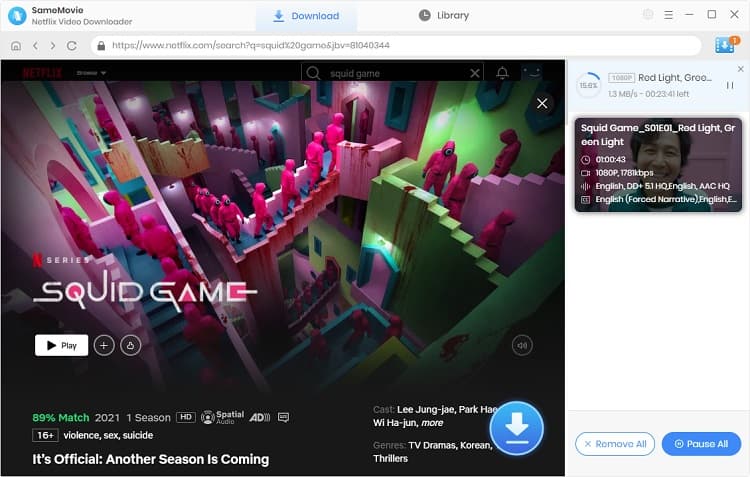
Once downloaded, you can go to the "Library" tab to find all the videos you downloaded.
STEP 6 Add Netflix Videos to Google Drive
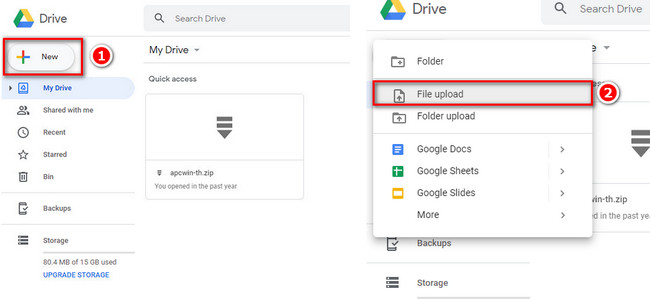
Open Google Drive, sign in with your Google account. Click the "+ New" icon first, then click the "File upload", and choose the Netflix video you want to add. You can enjoy watching Netflix on different devices without limits after adding it to your Google Drive!
3. How to Share Netflix Movies on Google Drive?
Once uploaded, if you want to share it with your friends on Google Drive, you can follow these steps:
❗️Note: Downloaded Netflix videos are for personal use only and should not be redistributed.
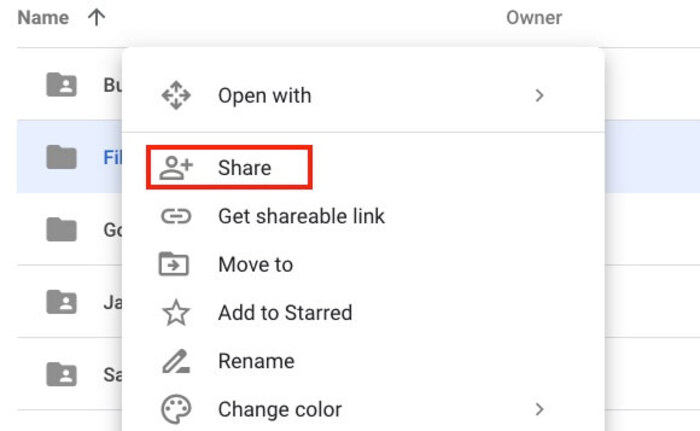
- Right-click on the file and select "Share."
- In the "Share with people and groups" window, enter the email addresses of the people you want to share the movie with.
- Choose the level of access you want to give them, such as Viewer, Commenter, or Editor.
- You can also choose whether to notify the recipients via email or not.
- Click the "Send" button to share the movie with the selected people.
Note that if you don't want to share the entire movie file, you can also create a shareable link for specific scenes or parts of the movie by using Google Drive's video editor.

How to Share Screen on FaceTime to Watch Netflix (100% Work)
Want to watch Netflix with friends on FaceTime without black screens or lag? Check out this guide to learn how to easily screen share Netflix on FaceTime!
Learn More4. FAQs about Adding Netflix Movies to Google Drive
Does uploading to Google Drive reduce video quality?
No. Uploading Netflix downloads to Google Drive does not reduce video or audio quality. The downloaded files remain in full HD. If you want to get the best quality, we recommend using SameMovie Netflix Video Downloader to keep the full HD video and original Netflix Dolby Atmos sound.
Is it legal to upload Netflix downloads to Google Drive?
Yes! Uploading Netflix downloads to Google Drive is legal as long as you use them for your own viewing. Remember not to distribute them in large quantities or sell them illegally.
Can I upload Netflix movies from multiple devices to the same Google Drive account?
Yes! You can upload Netflix movies from multiple devices to the same Google Drive account. All uploaded content will be stored in the cloud and can be accessed from any device linked to your account.
Final Words
Uploading Netflix downloads to Google Drive lets you store your favorite Netflix movies and series, synchronize them on multiple devices, and share them with your family and friends.
While Netflix downloads can't be transferred directly, SameMovie Netflix Video Downloader offers a reliable workaround, letting you download full HD Netflix movies and move to any device without limitations!
Tips: How to Improve the Resolution of Old Video to 4K?
Powered by algorithms and an AI engine, AVCLabs Video Enhancer AI can not only deblur each frame of a video, but also upscale the low-resolution videos to high-resolution (720p, 1080p, 4K, and up to 8K) with true details and motion consistency kept.
Learn More
Claire Green, a content writer specializing in blogs. With a passion for streaming video, Claire explores the latest trends, reviews popular platforms, and provides insightful tips for optimizing your streaming experience.


What You'll Need
Recommend