

How to Download Netflix Movies to MP4 [Full Guide]

Claire Green January 19, 2026 Category: Netflix Tips
Want to truly save Netflix movies forever without subscription restrictions? Want to stream Netflix freely across devices and platforms, or watch Netflix offline even without an internet connection?
All of the above are possible! In this guide, we will provide you with step-by-step instructions on how to download Netflix movies to the MP4 format directly. Simply follow the easy steps outlined below.
You may also want to know 👉: 8 Best Popular MP4 Movies Download Sites [Latest in 2026]
1. Why Converting Netflix to MP4 Failed in 2026
When you download shows in the Netflix app, the files are not in a standard video format such as MP4 or MKV. Instead, they use a specific format called NFV. Files with the .nfv extension cannot:
- ❌ Be played in any standard video player (like VLC or Windows Media Player)
- ❌ Be transferred to other devices and shared with friends/family
- ❌ Be converted directly to common formats like MP4, MKV, AVI, etc.
Why can't NFV be converted to MP4?
Actually, NFV is not an actual video file. It is simply a temporarily encrypted data stream generated by Netflix. The key is still held by Netflix and your device. Normal converters cannot access the key, so it’s impossible to convert Netflix to MP4 using other software.
Netflix designed these NFV files on purpose to prevent you from copying videos, sharing them with others, or saving Netflix permanently.
Besdeis, downloaded videos in the Netflix app usually have an expiration date, and once they expire, even the official app may not be able to play them. That's why people need to download Netflix as MP4 files. Here are the benefits:
- ✅ Save Netflix permanently, even if your Netflix subscription ends
- ✅ Transfer Netflix movies to any device, such as a USB drive, laptops, game consoles, SD card, etc.
- ✅ Watch Netflix offline - even if you are on the plane, train, or other weak internet regions.
2. The Easiest Way to Download Netflix to MP4
To download movies from Netflix to MP4, I personally recommend SameMovie Netflix Video Downloader. It is a comprehensive downloader that empowers users to fastly download Netflix videos as MP4 or MKV files meanwhile keep the original quality (up to 1080P).
Once downloaded, you can watch Netflix movies on VLC or transfer your Netflix movies to other devices, including USB drive, SD card, PS4s, Xboxes, Switches, etc. You can also download several Netflix movies or an entire Netflix season at a time. With the hardware acceleration function, Netflix movies can be downloaded at 10X faster speed.
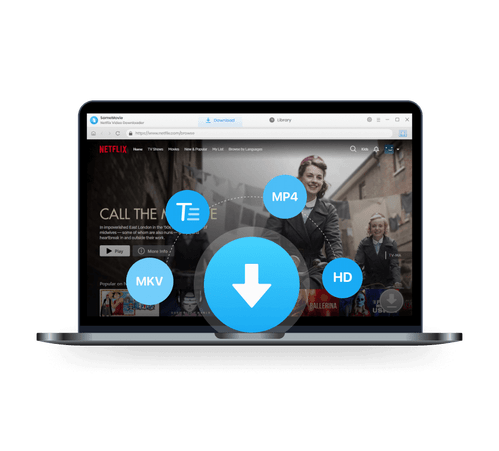
SameMovie Netflix Video Downloader:
- Download Netflix movies, TV shows, documentaries, and more
- Download Netflix videos with HD (1080p and 720p) quality kept
- Support downloading subtitles and audio tracks
- Support fast multi-stream and multi-video downloading
Check out Full Review of SameMovie Netflix Downloader >>
Free Trial Free TrialHow to Download Netflix Videos Using SameMovie?
Using SameMovie Netflix Video Downloader to download Netflix to MP4 format is straightforward.
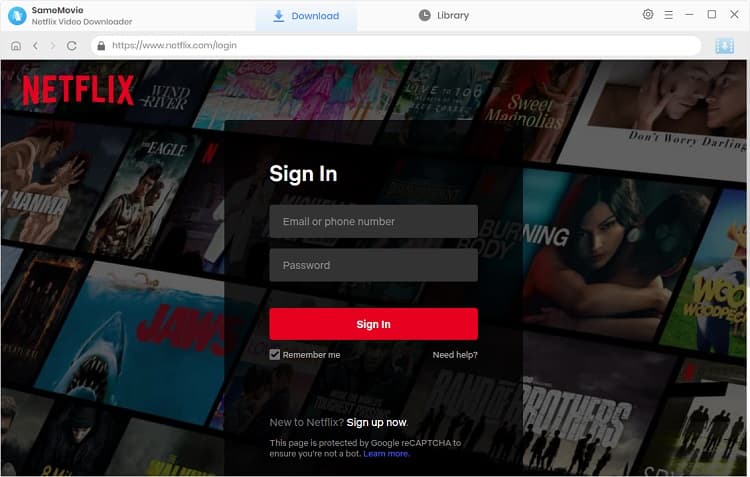
STEP 1 Sign in with Your Netflix Account
Install and launch SameMovie Netflix Video Downloader on your computer. Once you're in its user-friendly interface, click the "Sign in" button, and then log in with your Netflix account through the pop-up window.
Note: SameMovie needs to work with a Netflix account to access its service.
STEP 2 Select Default Output Format as MP4 Files
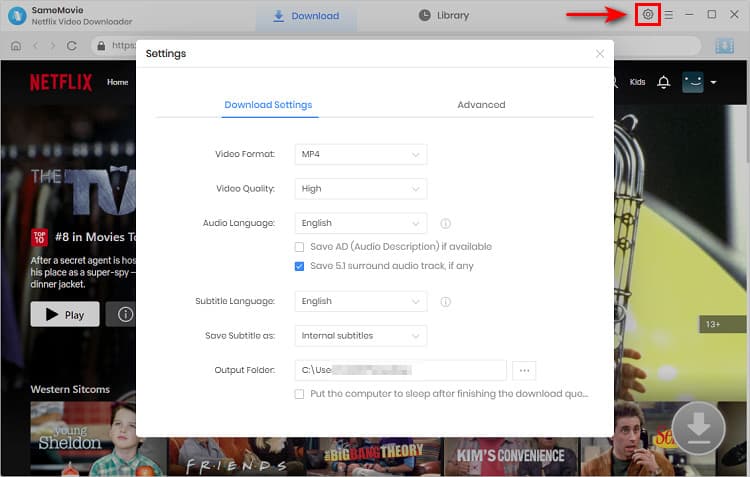
In this phase, click on the "Setting" icon located in the upper-right area of the program.
Within the "Download Settings" tab, you have the option to modify the default output to either MP4 or MKV. Please select the default output format as MP4. Moreover, you can also customize the video quality from High to Low, select the audio tracks and subtitle language, and save subtitles as Internal, External, or Hardcode subtitles.
Navigate to the "Advanced" tab, where you can specify the Video Codec according to your preference, choosing between H.264 or H.265. We also recommended ticking the box of "Enable hardware acceleration when available", which will enhance the download performance by using the GPU of the graphics card.
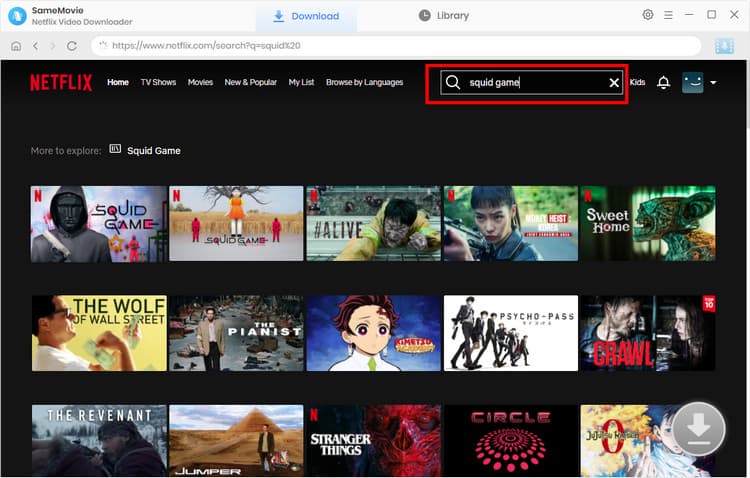
STEP 3 Select and Find Netflix Movies
Browse the built-in Netflix library or enter the Netflix video name in the search box to locate the movies you want. Click it and the "Download" icon  would become blue(available).
STEP 4 Adjust Advanced Download Settings
You can adjust the advanced download settings before downloading.
For Netflix TV shows, choose the season and episode first after clicking on the "Download" icon, and then customize the video by tapping the "Advanced Download" button. For Netflix movies, directly click the "Download" icon to access the "Advanced Download" window.
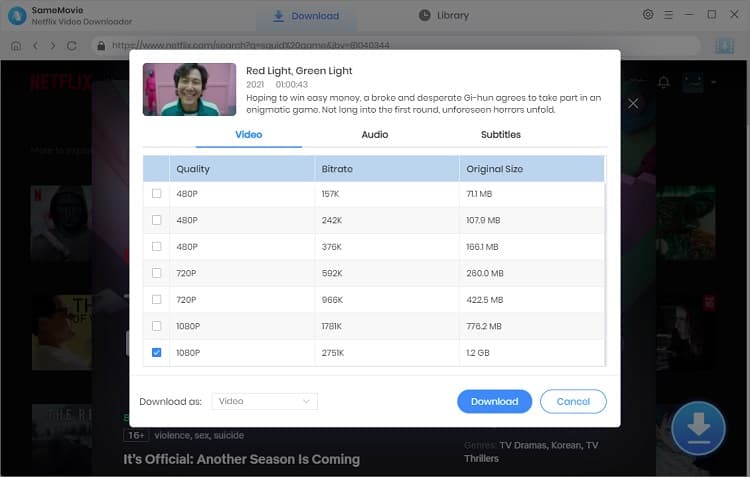
STEP 5 Download Netflix to MP4 Format
Click the "Download" button to initiate the download of your Netflix movies to MP4 files. Additionally, feel free to add other tasks to the download queue during the process.
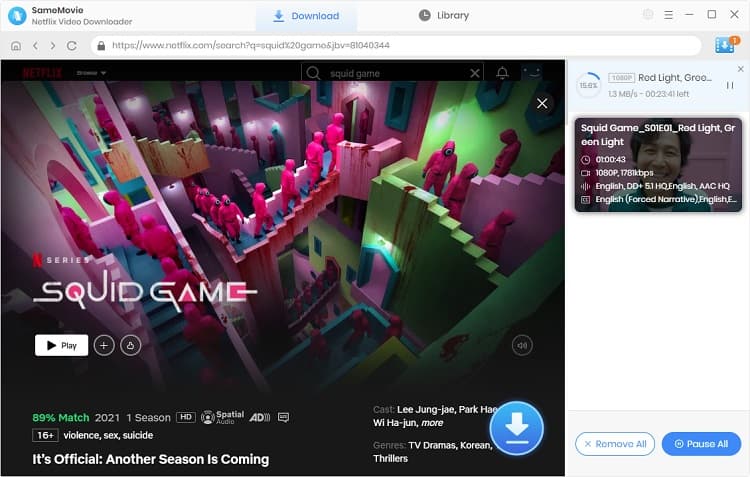
3. FAQs about Downloading Netflix Movies to MP4
MP4 vs MKV: Which is better for offline viewing?
Both MP4 and MKV files are normal and compatible with watching Netflix offline. However, there is a tiny difference. While MKV keeps better quality and sound effects, MP4 files are compatible with more devices. Downloading Netflix to MP4 or MKV actually depends on your personal needs. Here are the detailed comparisons between MP4 and MKV files:
| Feature | MP4 | MKV |
|---|---|---|
| More compatible | ✅ | — |
| Smaller file size | ✅ | — |
| Better video & audio quality | — | ✅ |
| Better subtitle support | — | ✅ |
| Multiple audio tracks support | — | ✅ |
| Chapters & menus support | — | ✅ |
| Easier to play | ✅ | — |
Can I download Neftlix to MP4 for free?
Yes! SameMovie is now offering an exciting promotion: if you leave a review on a trusted review site, you can get 1 month of free license, which allows you to download all Netflix movies for free with no limits! Check out for more details about this promotion.
Is it legal to download Netflix movies to MP4?
Sure! Downloading Netflix movies to MP4 with SameMovie is generally considered legal as long as you use it for personal use. However, if you distribute the downloads or even sell them without permission, this might violate Netflix's terms of service or local copyright laws.
Why can't I download movies on Netflix on laptop?
Here are 3 main reasons:
- Netflix stopped supporting downloads on Windows since 2024.
- There has never been a Netflix app for Mac.
- Netflix does not offer any download option in the browser.
Therefore, if you want todownload Netflix movies on a laptop, you may need to use a third-party tool like SameMovie to rip Netflix movies in original quality.
Final Words
Although Netflix allows downloading videos through its official app, the downloaded files are not MP4 files, and they can't be transferred or played on other devices. To address these issues, you can download Netflix movies and TV shows as permanent and transferable MP4 files with SameMovie Netflix Video Downloader.
By using SameMovie, everyone can fastly download Netflix videos on Mac or Windows with ease, never expire. Try it now!
Tips: How to Improve the Resolution of Old Video to 4K?
Powered by algorithms and an AI engine, AVCLabs Video Enhancer AI can not only deblur each frame of a video, but also upscale the low-resolution videos to high-resolution (720p, 1080p, 4K, and up to 8K) with true details and motion consistency kept.
Learn More
Claire Green, a content writer specializing in blogs. With a passion for streaming video, Claire explores the latest trends, reviews popular platforms, and provides insightful tips for optimizing your streaming experience.


What You'll Need
Recommend